


2026 Plug-and-Play Wireless CarPlay Adapter for All Compatible Vehicles
2026 Plug-and-Play Wireless CarPlay Adapter for All Compatible Vehicles
BUNDLE & SAVE
Couldn't load pickup availability
-
Ordered
- - -
Order Ready
- - -
Delivered

2026 Plug-and-Play Wireless CarPlay Adapter for All Compatible Vehicles


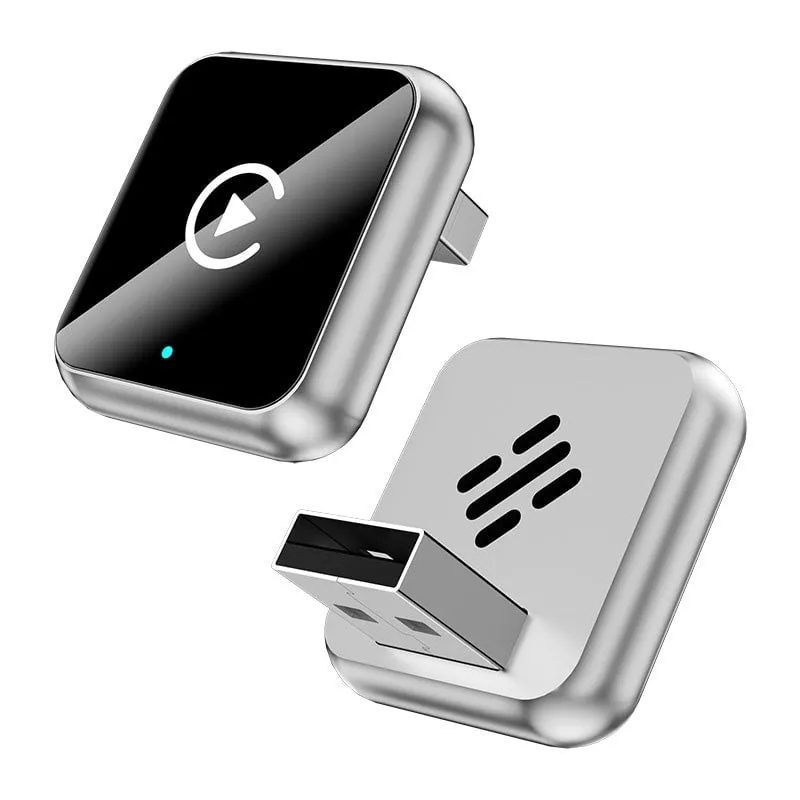
A cleaner in-car connection
Your factory screen.
Now cable-free.
Convert the wired CarPlay or Android Auto already built into your vehicle into a wireless routine. Pair once, start the car, and return to the interface you already know.
Compatibility requirementYour vehicle must already support factory wired CarPlay or wired Android Auto.


Remove the daily ritual
Get in. Start the car. Keep moving.
The first pairing replaces the repeated search for a cable. On later drives, the adapter is designed to reconnect when the vehicle starts, keeping the centre console clear and the phone free to stay in your pocket or bag.
One-time setup
Three steps to wireless
No dashboard disassembly, additional app, or professional installation is required.

-
01
Plug in
Insert the adapter into the factory USB port you currently use for wired CarPlay or Android Auto.
-
02
Pair once
Follow the one-time Bluetooth pairing prompt on your phone and vehicle screen. Setup is designed to take under two minutes.
-
03
Drive wireless
After setup, your phone reconnects automatically when you start the vehicle.
Dual-link architecture
Bluetooth to pair.
5.8 GHz to connect.
Bluetooth handles the initial pairing. A dedicated 5.8 GHz Wi-Fi link then carries the CarPlay or Android Auto experience between your phone and the adapter.
Connection time and performance can vary with the phone, vehicle system, and local wireless conditions.


Factory integration
Keep the controls you already know.
The adapter works through the vehicle's existing CarPlay or Android Auto system, preserving familiar ways to navigate, listen, call, and respond.
- Steering-wheel controls
- Factory touchscreen
- Rotary knob & buttons
- Factory microphone
- Siri & Google Assistant
Check before ordering
A simple compatibility test
Use the cable you currently have. The result tells you whether your vehicle has the required wired system.
- 1
Connect your phone to the vehicle with a data cable.
- 2
Confirm that CarPlay or Android Auto opens on the factory screen.
- 3
If it opens, this adapter is designed to convert that existing wired connection to wireless.
If the wired test does not launch the systemThis adapter cannot add CarPlay or Android Auto to a vehicle that does not already have it.
Designed to disappear
Four understated finishes.
A compact, low-profile shape sits neatly at the vehicle's USB port. Choose the finish that best suits your cabin.

Finish availability is shown in the product options above.

Compact by design
A small footprint for a cleaner console.
The adapter is sized to stay discreet once connected, without a loose cable running across the centre console.
Approximately 1.10 × 0.98 × 0.30 inches
Measurements describe the adapter body shown on the reference product page.
Good to know
Before your first drive
Clear answers about setup, connection, and vehicle compatibility.
Which vehicles can use this adapter?
It is designed for vehicles that already support factory wired Apple CarPlay or wired Android Auto through a USB connection.
Can it add CarPlay or Android Auto to my car?
No. It converts an existing factory wired system into a wireless connection. It cannot add the system to a vehicle that does not already support it.
Do I need to install an app?
No additional app is required. Insert the adapter and follow the one-time pairing prompt.
Do I have to pair my phone on every drive?
No. After the initial pairing, the adapter is designed to reconnect automatically when you start the vehicle.
How does the wireless connection work?
Bluetooth is used during pairing, followed by a dedicated 5.8 GHz Wi-Fi link for the CarPlay or Android Auto experience.
Will my original controls still work?
The adapter preserves the vehicle's existing steering-wheel controls, touchscreen, factory microphone, rotary knob, physical buttons, and supported voice assistant controls.
Does it support both phone platforms?
The reference product is a 2-in-1 solution for wireless Apple CarPlay and wireless Android Auto. Your vehicle must already support the corresponding wired system.

Ready when the engine starts
Start the car.
Leave the cable behind.
Return to the product options to choose the available finish for your vehicle.
Apple CarPlay is a trademark of Apple Inc. Android Auto is a trademark of Google LLC. Product compatibility depends on the existing vehicle and phone system.